BackupMaster and Rewind both protect Shopify stores from accidental deletions, bad imports, app errors, and unwanted changes. The central difference is not the interface, the number of features surrounding the backup, or even how frequently every backup runs. It is what each app captures and what a merchant can actually recover when data is lost.
Rewind has expanded beyond Shopify backup into monitoring, automated testing, change alerts, staging, and backups for Klaviyo and Mailchimp. BackupMaster has remained more focused on native Shopify backup, restoration, export, and store transfer. Based on the companies’ published coverage references, BackupMaster covers more native Shopify data and provides more self-service recovery paths for the data types compared below.
That distinction matters because frequency and completeness solve different problems. Backup frequency determines how much recent work might be lost. Coverage determines whether the information required to reconstruct the store exists in the backup at all.
Disclosure: we build BackupMaster. This comparison is based on public documentation and Shopify App Store listings from both companies, retrieved on August 28, 2026 and re-checked on September 1, 2026. We link to Rewind’s own sources for material claims, state BackupMaster’s limitations, and acknowledge the areas where Rewind offers more. If anything changes, email support@backupmaster.io and we’ll correct it.
The short version
If the primary reason you are buying a backup app is to recover native Shopify data after a deletion, import error, app malfunction, or unwanted change, BackupMaster has the stronger documented coverage and more self-service recovery options.
Rewind may be the better fit when selected real-time capture, Klaviyo or Mailchimp backup, or having monitoring, alerts, and staging in one commercial suite matters more than the Shopify recovery differences documented below.
The products therefore make different trade-offs. Rewind provides a broader suite around backup. BackupMaster focuses on retaining and restoring more of the native Shopify data that modern stores depend on.
At a glance
| Capability | BackupMaster | Rewind |
|---|---|---|
| Automatic backup schedule | Daily | Daily |
| On-demand backups | Yes | Yes |
| Real-time capture | No | Selected data, including product images |
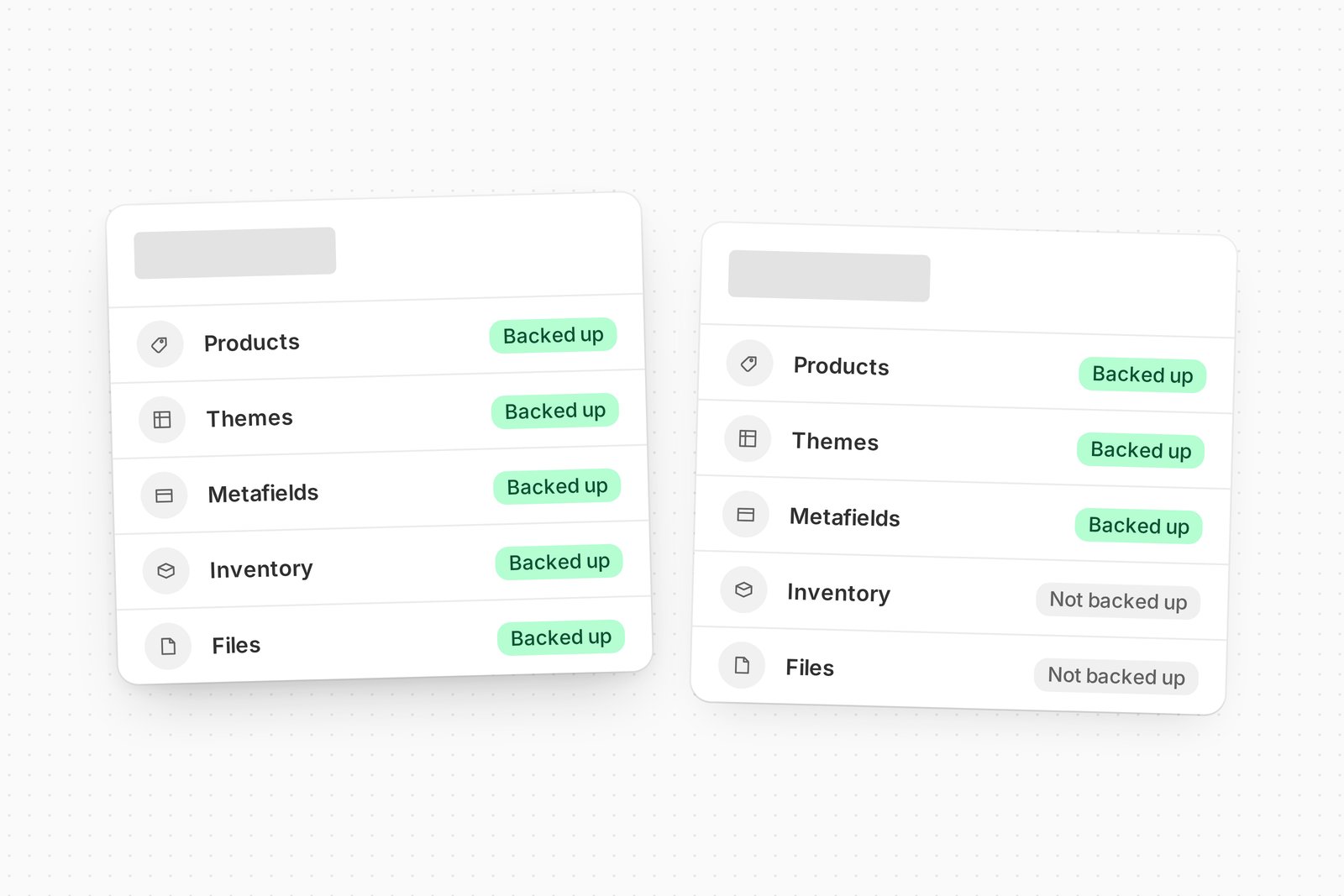
| Shopify Files | Backed up, self-service restored, and cloned | Not backed up |
| Inventory quantities | Backed up; recovered through Shopify’s CSV import | Not backed up |
| Cost, weight, and inventory-tracking fields | Backed up and restored | Listed as unsupported |
| Navigation menus | Backed up, self-service restored, and cloned | Backed up but not automatically restored |
| Product translations | Backed up, self-service restored, and cloned | Backed up but not automatically restored |
| Metafields | Backed up and self-service restored | Plan-dependent backup; engineering-assisted restore |
| Metaobjects | Backed up and self-service restored | Backed up and restored on eligible plans |
| Store-to-store copying | From Pro, starting at $39/month | Rewind Staging or Protection Suite, from $99/month |
| Klaviyo and Mailchimp backup | No | Yes |
| Monitoring and automated testing | Not included; available separately from monitoring providers | Included with Protection Suite |
Sources: BackupMaster’s coverage reference, Rewind’s coverage reference, and the companies’ pricing and App Store pages. All prices are in USD and increase with order volume.
The central difference: breadth, depth, and recoverability
A broad label such as “products backed up” does not tell you everything that will happen during recovery. Three separate questions matter.
Coverage breadth: which Shopify resource types are included? BackupMaster protects native data that Rewind lists as unsupported, including Shopify Files and inventory quantities.
Coverage depth: how much information is retained for each supported resource? A product is not only a title, description, price, and image. Its working state can also depend on variants, cost and weight information, inventory tracking, metafields, translations, collection relationships, files, and references to other Shopify objects.
Recoverability: can the merchant restore the information directly, does it require a documented export and import process, must the vendor’s engineering team become involved, or is the data unsupported?
These distinctions are why two apps can both say they back up products while producing materially different outcomes after the same product is deleted.
Backup and restore coverage
The table below distinguishes self-service restoration, documented manual workflows, support-assisted restoration, and unsupported data. Those are not equivalent levels of protection when a live store needs to be recovered.
| Shopify data | BackupMaster | Rewind |
|---|---|---|
| Products and core product fields | Backed up and self-service restorable | Backed up and self-service restorable |
| Variant cost, weight, and inventory-tracking fields | Backed up and restorable | Listed among unsupported product-inventory data |
| Inventory quantities by location | Backed up; recovered through a documented Shopify CSV workflow | Not backed up |
| Collections and product associations | Backed up and restorable | Backed up and restorable; manual ordering for smart collections is not preserved |
| Shopify Files manager | Backed up, restored, and cloned | Not backed up |
| Navigation menus | Backed up, restored, and cloned | Backed up but not automatically restored; Rewind says its team can assist manually |
| Product translations | Backed up, restored, and cloned | Backed up but not automatically restored |
| Metafields | Backed up and self-service restorable | Backup availability depends on the plan; restoration goes through Rewind’s engineering team |
| Metaobjects and definitions | Backed up and self-service restorable | Backed up and restorable on eligible plans; certain referenced fields cannot be restored |
| Orders | Backed up and exportable; not restored or cloned | Backed up but not automatically restored; Rewind says its team can assist manually |
| Third-party app data | Not backed up | Generally not backed up; Klaviyo and Mailchimp backup is available |
Full references: BackupMaster’s coverage documentation and Rewind’s coverage documentation.
A Shopify product is more than its visible product page
Restoring a product is not only a matter of recreating its title, description, price, and images. Its operational state can also depend on variant attributes, cost and weight information, inventory tracking, quantities at each location, metafields, translations, files, collection relationships, and referenced content.
Rewind’s published documentation lists the core product fields it backs up and restores, but lists product inventory and related fields such as weight, measurement, cost per item, and inventory tracking as unsupported. BackupMaster’s published product coverage includes those related variant fields.
Inventory quantities are one part of that distinction. BackupMaster records quantities by location, but recovery is not one click: the merchant downloads the relevant CSV from BackupMaster and imports it using Shopify’s inventory import. The limits and steps are documented in the inventory restore guide. Having a recoverable record is materially different from the quantities not being present in the backup, but the manual workflow should be understood before an incident.
Modern Shopify stores depend on connected data
Metafields, metaobjects, files, menus, and translations increasingly determine how a Shopify storefront works. They can contain size charts, specifications, downloadable resources, structured page content, localization, navigation, and relationships between resources. Losing these dependencies can leave products present in the admin while the storefront remains incomplete or broken.
Rewind now supports metaobjects on eligible plans, including granular and advanced restore options. Its documentation also states that metafield restores go through its engineering team, menus and product translations are not automatically restored, and Shopify Files are unsupported.
BackupMaster makes metafields, metaobjects, files, menus, and translations available through its own restore and cloning workflows. The practical advantage is not merely a longer list of backup categories. It is the amount of supported Shopify data a merchant can put back without waiting for vendor intervention or rebuilding it manually.
Implementation differences matter
Backup apps can use Shopify’s APIs and model related resources differently. A limitation documented by one provider may reflect its current implementation, permissions, or product scope rather than a platform-wide restriction. Merchants should therefore compare the actual coverage delivered by each product.
The most useful question is therefore not why a particular field is missing. It is whether the provider can show that the field is captured and explain exactly how it will be recovered.
What happens during an actual recovery
The differences become clearest when expressed as recovery outcomes.
| After data loss | BackupMaster | Rewind |
|---|---|---|
| A product must be recreated | Restores supported product and variant data, including cost, weight, and inventory-tracking fields; quantities use a documented CSV workflow | Restores its documented core product fields; inventory and related fields are listed as unsupported |
| A Shopify File is deleted | Backed up and self-service restorable | Shopify Files are not backed up |
| Navigation menus are damaged | Restored directly in the app | Backed up but not automatically restored; Rewind says its team can assist manually |
| Product translations are overwritten | Restored directly in the app | Backed up but not automatically restored |
| Metafields are damaged | Metafields and their definitions are self-service restorable | Backup depends on the plan; restoration goes through Rewind’s engineering team |
| Metaobject content is deleted | Definitions and entries are self-service restorable | Definitions and entries are restorable on eligible plans, subject to documented reference limitations |
| Store data must be copied elsewhere | Transfers supported products, collections, pages, menus, blogs, Files, themes, customers, metafields, metaobjects, and translations | Rewind Staging excludes customers, inventory, navigation menus, and non-product metafields |
“Saved somewhere” and “recoverable by the merchant” are not the same protection level. A recovery that depends on support availability or manual reconstruction creates a different operational risk from a restore that the merchant can initiate directly.
Backup frequency matters within the available coverage
Rewind’s real-time capture is an advantage when two conditions apply: the merchant requires a recovery point measured in minutes, and the required data type is included in Rewind’s real-time coverage. Rewind’s documentation says daily backups cover the store generally, while some items, including product images, are captured in real time.
BackupMaster performs automatic daily backups and lets merchants start additional backups on demand. An on-demand backup can be created immediately before a planned import, bulk edit, app installation, theme change, or other high-risk operation. Stores with strict sub-day recovery-point requirements should still account for the difference rather than assume a daily schedule will meet their needs.
Frequency and completeness nevertheless solve different problems. A recent backup reduces the amount of supported work that might be lost. It cannot restore a Shopify resource, field, or relationship that was never captured. Establish the required coverage and restore path first, then compare backup intervals within that coverage.
What recent merchant reviews illustrate
App Store reviews are individual experiences, not controlled product tests, and Rewind has a long history with a substantial majority of positive reviews.
Several recent one-star reviews describe problems encountered during restoration. Merchants have reported missing inventory tracking, collection ordering that was not retained, incomplete recovery, and restores that required manual support. Some of those experiences correspond with limitations disclosed in Rewind’s own coverage reference.
Those reviews do not establish that Rewind restores generally fail. They demonstrate why coverage needs to be verified before an incident. A merchant should not assume that “products backed up” means every related field, quantity, reference, and relationship required to reconstruct the product is recoverable.
Store cloning and staging
Both companies provide ways to move data between Shopify stores, but the scope, workflow, and packaging differ.
BackupMaster includes store cloning from its Pro plan, starting at $39/month. Supported types include products, collections, pages, menus, blogs, Files, themes, customers, metafield definitions, metafields, metaobject definitions, metaobjects, and translations. Dependencies and references are resolved during transfer where supported. Inventory quantities transfer separately through Shopify’s CSV workflow. Orders, store settings, and third-party app data are not transferred.
Rewind offers store copying through Rewind Staging, which starts at $99/month as a separate Shopify app and is also included with Protection Suite. Rewind’s Staging coverage documentation lists products, product images and metafields, pages, blogs, files, collections, and themes as supported. It states that Staging does not copy customers, orders, inventory, navigation menus, or non-product metafields. Its FAQ describes the process as one-way and limits non-Plus stores to 1,000 variants per day.
Rewind Staging is positioned as an ongoing environment for testing and deployment. BackupMaster’s cloning covers more of the native Shopify categories compared here and starts at a lower price, but it is a cloning and transfer capability rather than a complete development-deployment platform. The relevant choice is whether the merchant needs an ongoing staging workflow or broader data transfer.
Backup coverage versus a broader protection suite
Rewind Backup + Restore includes backups for Klaviyo and Mailchimp. Rewind’s Protection Suite adds storefront monitoring, automated user-journey testing, bulk-change alerts, and staging. BackupMaster is more narrowly focused on native Shopify backup, restoration, export, and store transfer.
These are different product strategies. Rewind offers more adjacent operational tools in one package. BackupMaster’s documented advantage is the range of native Shopify resources covered, the related data retained for supported resources, and the number of recovery operations merchants can perform themselves.
The distinction matters because monitoring, testing, and alerts can help detect or prevent an incident, but they do not add missing Shopify data to a restore point. Monitoring tells you that something has broken. Backup coverage determines what can be recovered afterward.
Monitoring can be purchased separately
A merchant does not have to choose its backup provider in order to obtain storefront monitoring. Dedicated Shopify apps such as Uptime independently provide automated storefront tests, outage detection, and real-time alerts.
Monitoring should therefore be evaluated separately from backup coverage. It can help identify that something has broken, but the backup determines which data can be recovered afterward.
Pricing
Both backup products price their Shopify plans primarily by monthly order volume, so merchants should compare the tiers that correspond to their own stores rather than headline entry prices alone.
BackupMaster starts at $19/month for stores with up to 300 orders. Pro starts at $39/month for up to 600 orders and adds exports, scheduled Google Drive uploads, and store cloning. Plus starts at $79/month for up to 1,500 orders, with additional tiers for larger stores. Daily backups, version history, and individual and bulk restores are included across all tiers.
Rewind Backup + Restore also starts at $19/month for up to 300 orders. Protection Suite starts at $99/month and combines Backups with Monitor, Alerts, and Staging. Rewind Staging is also listed separately at $99/month. Metafield and metaobject backup availability can depend on the Rewind plan.
Merchants who prefer BackupMaster but also require storefront monitoring should compare the combined cost of BackupMaster and a separate monitoring provider with the relevant Rewind Protection Suite tier. Current pricing should be confirmed on the BackupMaster pricing page, Rewind pricing page, and the selected monitoring provider’s listing.
Security
Both products publish established security and compliance practices, so security alone is unlikely to decide between them. Rewind reports SOC 2 Type II and ISO 27001 compliance and hosts on AWS.
BackupMaster maintains SOC 2 compliance through continuous monitoring and an annual independent audit, hosts on Microsoft Azure, and encrypts stored data using AES-256. Its compliance material is available in the security documentation and Trust Center.
For most merchants, coverage, recovery mechanics, acceptable recovery point, and dependence on vendor assistance are more likely to determine the practical outcome after data loss.
Which Shopify backup app should you choose?
BackupMaster may be the better fit if:
- Your priority is reconstructing as much supported native Shopify data as possible.
- Files, menus, translations, metafields, metaobjects, and related product data are important to your store.
- You want more recovery operations to be available directly in the app rather than through vendor engineering.
- You need broad store-to-store cloning without purchasing a separate staging product.
- Daily automatic backups plus on-demand recovery points meet your requirements.
Rewind may be the better fit if:
- You have a documented requirement for sub-day capture and the required resources are included in Rewind’s real-time coverage.
- You need Klaviyo or Mailchimp backup.
- You specifically want monitoring, automated testing, bulk-change alerts, and staging bundled with the backup product.
- Rewind’s longer operating history and larger review history are important to your procurement process.
The question that matters before a restore
The right backup app is not necessarily the one with the longest surrounding feature list or the shortest interval between selected backups. It is the one that protects the data your store requires and provides a recovery process your team can actually execute.
Before choosing either product, compare your store’s essential data against BackupMaster’s coverage reference and Rewind’s coverage reference. Do not stop at whether a category is described as “backed up.” Check which fields and relationships are captured, whether restoration is automatic, and whether recovery can be performed without vendor intervention.
For native Shopify recovery specifically, BackupMaster has the stronger published coverage and more self-service recovery paths across the data types compared in this article. Rewind’s stronger case is its surrounding protection suite, selected real-time capture, and backup of Klaviyo and Mailchimp.
Start your free trial of BackupMaster today →